



Digital Calendar, 15.6 inch Wall Planner & Chore Chart, Rechargeable Full HD Touchscreen Display, Portable Smart Family Organizer, Event Planner, Perfect for Family Schedules – Wall Mount Included, No Subscription
Original price was: $289.99.$239.99Current price is: $239.99.


Product description


1 Meal Planning 2 Custom Lists 3 Reminders 4 Sleep Mode 5 Weather
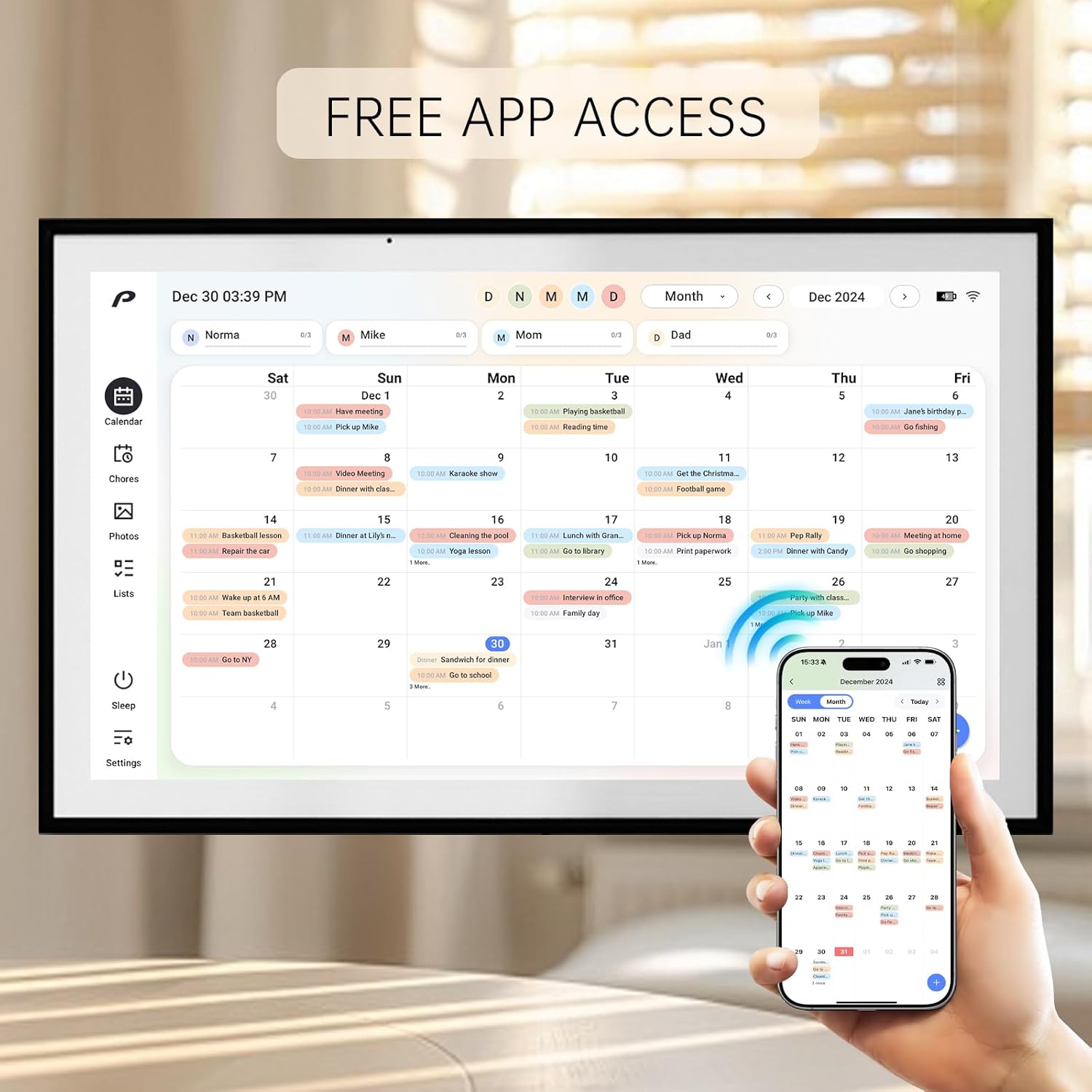
All-in-One Family Organizer: Sync effortlessly with Google, Outlook, iCloud, Yahoo, and Cozi calendars to streamline dinner plans, chore charts, and lists. Keep your smart home running smoothly with this digital wall calendar
Rechargeable & Wireless Convenience: With a built-in rechargeable battery, this electronic calendar lets you stay organized without being tied to a power outlet. Ideal for flexible use in calendars, planners & organizers
WiFi Connectivity & Free App: Access your smart calendar anywhere with the free app and WiFi connection. Update events, manage chores, and plan meals in real time, making family planning easy and efficient
Simplify Chores & Meal Planning: Stay on top of household tasks with the built-in chore chart and dinner planner. Assign responsibilities, plan meals, and keep everyone on the same page—all in one convenient smart calendar
1080P Touchscreen Clarity: Enjoy a full HD 1080P digital calendar wall touch screen with vivid visuals and easy navigation. This smart touchscreen calendar is perfect for family planning, chores, and schedules in your smart home setup
Free Photo and Video Sharing: Turn Your Calendar into a Digital Photo Frame when it’s not in use, share your photos and videos through our free app from anywhere in the world. Perfect for family moments and decor






Shashank Tomar –
A Game-Changer for Family Organization
When I first unboxed this 15.6-inch digital calendar, I admit I was skeptical: could a wall calendar really replace sticky notes, Excel sheets, and mental reminders? But after a few weeks of daily use, I’m convinced this is one of the best investments our household has made.What I Love & How I Use It1. All-in-One Family HubThis device isn’t just a calendar — it’s a full family command center. It synchronizes effortlessly with Google Calendar, Outlook, iCloud, Yahoo, and Cozi, so every appointment (soccer practice, dentist, parent-teacher conference) shows up for everyone to see.I’ve also used the built-in chore chart and dinner planner to assign tasks, track progress, and rotate responsibilities among kids. No more “Mom, what’s tonight’s dinner?” arguments.2. Elegant, High-Definition DisplayThe 1080p touchscreen is bright, crisp, and responsive. Even from across the room, you can read the calendar clearly.Swiping between days, weeks, or chore charts feels smooth and intuitive — much better than fiddling with tiny buttons or clunky interfaces.3. Rechargeable & Wireless — Flexible PlacementBecause it has a built-in battery, I wasn’t forced to place it next to an outlet. I mounted it near our kitchen’s command center (right above the meal prep counter), and it stays charged for days.This portability means we could move it when we reconfigured our space — no wiring mess, no plug constraints.4. Remote Updates via WiFi & Free AppOne of the best features: if my spouse or I are out and need to add or modify an event (e.g. “Parent meeting pushed to 6:30”), we open the app and it syncs instantly.The moment the change is made, the wall display updates — no need to shout across rooms or argue over who messed up the handwritten calendar.5. Double Duty: Photo Frame & Family MomentsWhen the calendar isn’t front and center, it morphs into a digital photo frame. We love this. It’s a lovely touch: at dawn or after bedtime, our family photos or short video clips rotate on the screen. It adds warmth and personality, so it doesn’t feel like a sterile piece of tech but rather a part of our home.⸻Minor Notes & Tips• Initial setup takes a little patience. You’ll walk through WiFi, calendar accounts, chore templates, etc. But the app guidance is solid, and after the first hour, everything runs smoothly.• Battery longevity is pretty good, but if you leave it mounted far from power for weeks, you’ll eventually need to recharge it. That said, the recharge time is reasonable.• Wall mounting is included, but make sure the spot you pick has good WiFi coverage. In one room, I needed to boost the network to avoid syncing lags.⸻Final ThoughtsThis digital calendar has completely transformed how our family coordinates. No more forgetting appointments, dropped chores, or last-minute dinner surprises. It brings tech elegance into daily life and makes organization almost fun.If you’re juggling multiple schedules, kids, chores, and want a central, smart, beautiful solution — this Pronext 15.6” Digital Calendar & Chore Chart is worth every penny. Highly recommended!
Mike C. –
Technology That Makes Family Life Easier
I’ve been using both a whiteboard calendar and Google Calendar to manage daily chores, appointments, and tasks, and it’s been a pain juggling multiple calendars. I recently got the Pronext 15.6″ Digital Calendar, and it’s been working really well so far.What I like most is that it’s a true family calendar where everyone can easily add or remove tasks and appointments. The screen is a good size for a kitchen or living room setup (about 17 inches diagonally), and the 1080p HD touchscreen is sharp and clear. It syncs smoothly with Google, Outlook, iCloud, and other calendars. I mainly use Google Calendar, and it worked right out of the box. It also comes with a stand that can swivel, as well as hardware for wall mounting. I chose to use the stand, which feels sturdy and heavy, and it doesn’t tip over easily, which is great.The calendar app includes handy built-in features such as a chore chart, shopping list, and meal planner, which are super useful for families with kids. The frame looks like a stylish picture frame, so it fits in nicely with home decor. When you’re not using it as a calendar, it doubles as a digital photo frame to display your favorite pictures.Setup was quick and easy, and the free app makes it simple to add or edit events and assign chores from your phone. It comes with a printed manual, and I also found a PDF version on the company’s website. The rechargeable battery and wireless design make it easy to move around or mount on the wall, though I just keep mine plugged in.Overall, I think this is a great all-in-one family organizer that looks good, works smoothly, and keeps everyone on track. If you’re thinking about getting a digital photo frame, this is an even better option since it does everything a photo frame does, plus so much more.
YMCA swimmer –
Works well. Room for improvement.
Reminiscent of a wooden picture frame, this digital calendar doubles as a digital one.You will need a free account and a calendar app. I initiallywanted to use it without connecting to any network, but the first thing it wants to do when booted is to connect to WiFi. Then, you use a QR code to pair it with your Pronext Calendar app.When transferring pictures, sometimes I got transfer filed errors. It also seems that pictures reside in the app – there’s no way I could see to delete them directly from the device itself. Size of the pictures might also matter.Plus, if you take any vertical pictures, the default setting is to display them with a lot of black space to each side. They can be rotated manually, but there’sno way to save that setting. Even for landscape-format pictures, there is some black space to each side, as can be seen in the forrest picture. I could not find a way to select the option to fit the screen. Perhaps that’s one of the improvements.It has a battery, but is designed to be plugged in using the included power adapter. The battery does last a few hours.There’s also something that looks like a usb-c connector in the back, but the manual doesn’t talk about it at all. I would love to use it as a second /expansion screen for my laptop or phone. Perhaps it is another opportunity for improvement or better documentation.It is possible to add calendar or chore items directly on the device using onscreen keyboard. If it could use a Bluetooth keyboard, that would be a plus.Last but not least, perhaps it could add clock / weather display option, particularly since it is connected to the internet.Overall, a good device, with room to grow.