
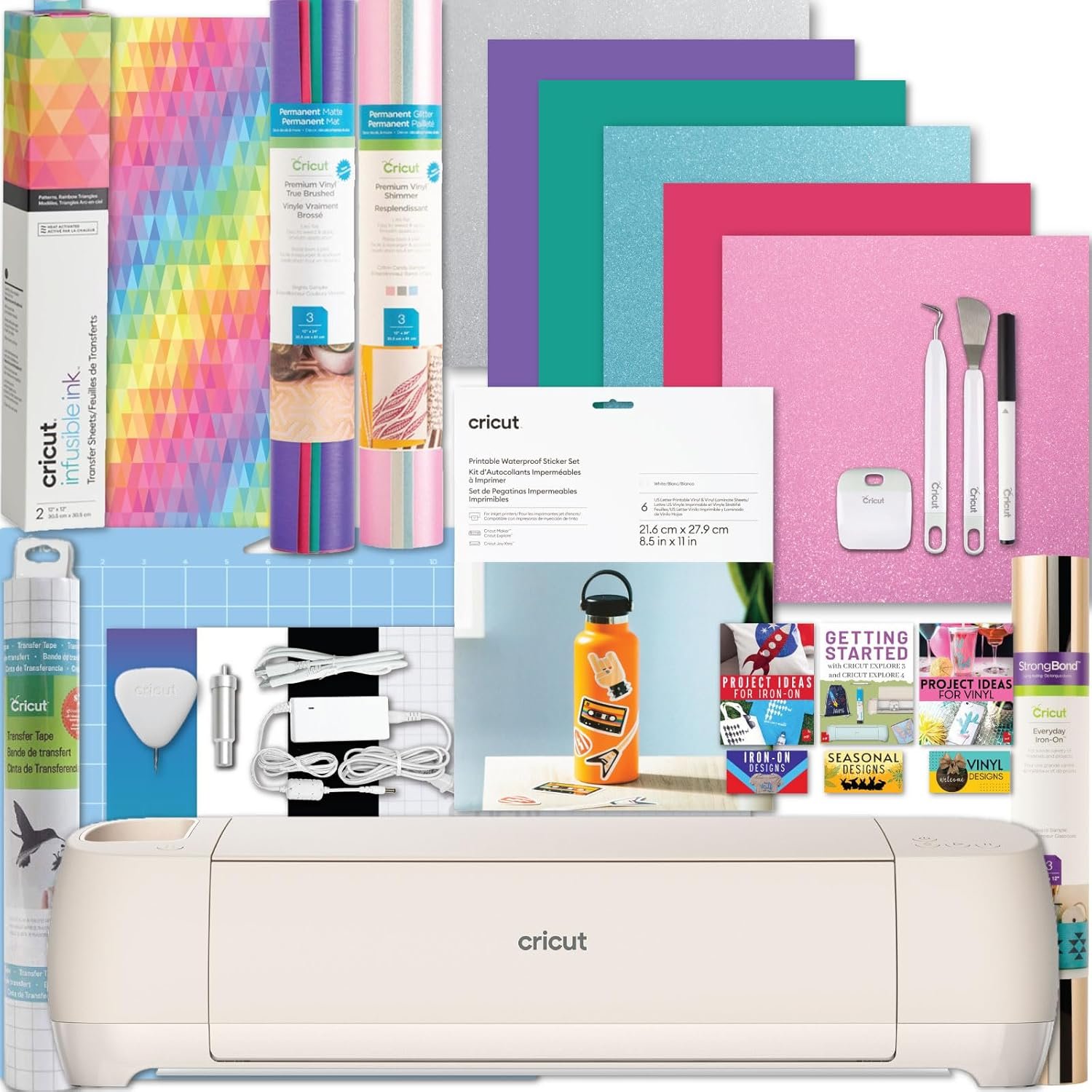


Cricut Explore 4 Machine Ultimate Sticker Sampler Bundle- Vinyl Roll, Infusible Ink, Sticker Making Set, Iron-On Roll, Tools and Cutting Mats, Beginner Cutting Machine Set for Die-Cutting Projects
Original price was: $319.99.$299.99Current price is: $299.99.


Product description

Key Features
Your New Favorite Die-Cutting Machine
For the crafter looking to make popular projects like custom apparel, home decor, larger decals, stickers & more but want to have options to grow; the Cricut Explore 4 is for you! Make two times the cards at a time compared the Cricut Joy and Joy Xtra, make festive banners up to 12 feet long, or make your favorites in multiples.
Precision-Cuts 100+ Materials
From the essentials like vinyl, iron-on and paper to more specialty materials like felt, leather, the Cricut Explore 4 gives you a great range of popular materials to work with and something new to try! Work with Smart Materials for longer continuous cuts up to 12 ft without a mat!
Compatible with 6 Tools
With 6 compatible tools, Cricut Explore 4 cuts 100+ materials, writes, draws, scores and foils! Select tools sold separately. It also has the ability to make full-color printable stickers with the print-then-cut feature.
About the Cricut Explore 4 Dimensions: 22.2 in x 7 in x 5.9 in (56.4 cm x 17.8 cm x 15 cm) Weight: 11.1 lbs (5.03 kgs) Max cut size with machine mat: 11.5 in x 23.5 in (29.2 cm x 59.6 cm) Max cut size with Smart Materials: 11.7 in x 12 ft (29.7 cm x 3.6 m) Cut speed: up to 14.1 ips World-class customer support is available via phone or chat

Cricut Explore 4 Digital Guides
Included with your bundle are digital guides to help you with setting up your machine, getting started with materials, frequently asked questions, troubleshooting tips and more!

Digital Assets
With the guides, you will also receive unlimited access to 30+ digital design images (SVG files). These are available for your personal use to help you get started crafting!

Cricut Design Space App
Easy-to-use Design Space app included with purchase. You will use this app to set up your machine, create and make! The app included numerous images, projects, and fonts for you to use or you can create your own! Cricut Access is an additional subscription that can be added separately, but is not needed to use the machine. Design Space app works on mobile phones & laptops (iOS, Android, Windows, and Mac)
Which Cricut Machine is right for you?

Cricut Maker 4
Ideal Projects
Metal Engrave, Wood Projects, Quilts, Large Vinyl Decals, Signs, Apparel, & more
Cutting Capabilities
Max Width: 13 in. | Max Length: 12ft | 300+ materials
What Can It Do?
Cut, Write, Draw, Foil, Score, Engrave, Deboss, Perforate, Print-then-Cut
Popular Materials
Vinyl, HTV, Infusible Ink, Cardstock, Basswood, Leather, Acetate, Fabric & more

Cricut Explore 4
Ideal Projects
Large Vinyl Decals, Stickers, Jewelry, Signs, Apparel, Mugs, Labels, & more
Cutting Capabilities
Max Width: 13 in. | Max Length: 12ft | 100+ materials
What Can It Do?
Cut, Write, Draw, Foil, Score, Print-then-Cut
Popular Materials
Vinyl, HTV, Infusible Ink, Cardstock, Kraft Board, Leather, Felt, & more

Cricut Joy Xtra
Ideal Projects
Stickers, Cards, Decals, Labels, Mugs, T-Shirts
Cutting Capabilities
Max Width: 8.5 in. | Max Length: 4ft | 50+ materials
What Can It Do?
Cut, Write, Draw, Foil, Print-then-Cut
Popular Materials
Vinyl, HTV, Infusible Ink, Printable Stickers, Cardstock, Paper, Writable Labels
Compatibility
Bluetooth only

Cricut Joy
Ideal Projects
Cards, Decals, Labels, Mugs, Gift Tags, Small Apparel, Place Cards
Cutting Capabilities
Max Width: 5.5 in. | Max Length: 4ft | 50+ materials
What Can It Do?
Cut, Write, Draw, Foil
Popular Materials
Vinyl, HTV, Infusible Ink, Cardstock, Paper, Writable Labels
Compatibility
Bluetooth only

Is Discontinued By Manufacturer : No
Product Dimensions : 9.2 x 24.2 x 9.4 inches; 19.3 Pounds
Item model number : z20-11070-R4
Date First Available : July 3, 2025
Manufacturer : Cricut
ASIN : B0DVWS64Y4
Best Sellers Rank: #9,767 in Arts, Crafts & Sewing (See Top 100 in Arts, Crafts & Sewing) #8 in Scrapbooking Die-Cut Machines
Customer Reviews: 4.7 4.7 out of 5 stars 86 ratings var dpAcrHasRegisteredArcLinkClickAction; P.when(‘A’, ‘ready’).execute(function(A) { if (dpAcrHasRegisteredArcLinkClickAction !== true) { dpAcrHasRegisteredArcLinkClickAction = true; A.declarative( ‘acrLink-click-metrics’, ‘click’, { “allowLinkDefault”: true }, function (event) { if (window.ue) { ue.count(“acrLinkClickCount”, (ue.count(“acrLinkClickCount”) || 0) + 1); } } ); } }); P.when(‘A’, ‘cf’).execute(function(A) { A.declarative(‘acrStarsLink-click-metrics’, ‘click’, { “allowLinkDefault” : true }, function(event){ if(window.ue) { ue.count(“acrStarsLinkWithPopoverClickCount”, (ue.count(“acrStarsLinkWithPopoverClickCount”) || 0) + 1); } }); });
CRICUT EXPLORE 4: A brand new writing and cutting smart machine makes crafting projects easier than ever before. Cricut Explore 4 Machine cuts up to 2X faster compared to previous models allowing you to personalize faster than ever. It cuts 100+ materials from paper, iron-on, vinyl, felt and more! Making personalized home decor, decals and more just got easier with this cutting machine. Original Cricut Manufacturer 12 month Machine Warranty is included. Packaged in original packaging.
PRECISION CUTS 100+ MATERIALS: Cuts everything from the essentials of iron-on and vinyl to delicate paper and cardstock. The Explore 4 works with additional blades and tools to add pro-level effects such as scoring, writing, foiling, and more. The built in sensor recognizes and precision cuts around ink-jet printed images to create full-color stickers and more! Smart Materials work without a mat for faster and longer cuts.
ULTIMATE BUNDLE: This bundle is the perfect for everyone- from beginners to professionals to try a variety of Cricut materials and test out all sorts of crafting styles. Make your own shirts, stickers, decals and more with this bundle packed full of materials like vinyl, iron-on, infusible ink and a waterproof sticker making kit! It also comes with the tools need to start crafting right away.
DIGITAL GUIDE: The instructional full-color eBooks included; feature tips, troubleshooting FAQ and full project tutorials to help you get started with your new Cricut Explore 4 and all of the materials! Get started with the included digital designs (SVGs) or use them as inspiration to create your own. Our customer service team is here to answer any questions before, during and after your purchase too! Look for the flyer in the box for access to your instructions. (Print copy unavailable).
INCLUDES: 1- Cricut Explore 4, 2- Cricut Vinyl Sampler Roll, 1- Cricut Iron-on Sampler, 1- Cricut Infusible Ink Sheets Pack, 1- Cricut Waterproof Sticker Set, 1- Explore 4 Digital Guide with instructional manual, project tutorials and inspiration, SVG Digital Designs and more (print copy unavailable), In the Explore 4 Box: Cricut Cutting Mat, Pen, Sample Materials, Fine Point Blade, Mini Weeding Tool



Amazon Customer –
It does so much!
I really enjoy this machine. Set up was easy. I use it for making homemade cards, iron on transfers, vinyl transfers to hard surfaces, and much more! The free software is easy to use and while there was a learning curve it is still very easy to do. This is my first Cricut machine so I have no idea of comparability to other machines. But I am definitely not disappointed!
Johnnie –
Excited for our cricut
I bought the cricut machine for my girlfriend and she was so happy to play around with it and even to open it up and get it set up. Learning how to work with the cricut is a learning process and can be frustrating but I just watch YouTube videos or TikTok videos to help me learn. The cricut machine is definitely worth the money especially the bundle. It’s fairly easy to set up and it functions very well.
Kelly Strauss –
Fav product
What a steal! I absolutely love the quality and cutting accuracy of it
Coby –
IF YOU LIKE MAKING COOL THINGS-GET THIS!!!
I LOVE MY CRICUT MACHINE!!! I honestly was so intimidated by it, it took me a month to bust it out and figure out how to use it 😂 It’s so easy!! You get the hang of it pretty quickly. I have discovered that I love making things for people! I can make SO many super cool things with this kit!! I’ve done a bunch of heat press things. And stickers. And cups. And notebooks! I even make my own business shirts with my logo! It’s a fantastic buy with everything that comes in this kit! Highly recommend!!!
michelle howell –
Works great
Everything works great worth every penny
Stephanie cortez –
Great price for what’s included!
Everything to start practicing before investing in so much material. I would have loved for them to include enough transfer tape. I’ve loved both the cricut and the heat press easy to use.
The black Italian company llc. –
Production
Great product highly recommended
Kathy Mc. –
I love it and don’t know why I waited so long to take the plunge !!!
Love it — worked right out of the box (but I do have experience with Design Space). If you’ve never used the Design Space program, it may take a bit more time, but it is easy to learn the basics. It also works with my own graphic designs and that is what I was wanting.