


SUNLU PLA Filament 16 Color Bundle Multicolor, PLA 3D Printer Filament 1.75mm, Individually Vacuum Packed, 0.25kg per Spool, 4kg in Total, 16 Pack. (12 Regular Solid Color and 4 Transparent Color)
$73.99



Product description
SUNLU 3D Printer Filament
The video showcases the product in use.The video guides you through product setup.The video compares multiple products.The video shows the product being unpacked. SUNLU PLA filament Merchant Video
PLA Filament 1.75mm


1 Neatly Wound Spool
2 Good Layer Adhesion
3 High Precision Printing
4 Smooth Print Surface
5 Ultra-Pure Raw Materials


1 SUNLU PLA Filament
2 High Compatibility
3 3D Printing Setting
4 Vacuum Packaging
 Create Endless Possibilities
Colorful filament to meet your colorful needs.


1 Colorful PLA Filament
2 Regular Color Series
3 Silk Color Series
4 Clear and Candy Series
5 Special Color Series

Featured Products Recommended by SUNLU
Add to Cart
Add to Cart
Add to Cart
Add to Cart
Add to Cart
Add to Cart
Customer Reviews
4.3 out of 5 stars 20,280
4.3 out of 5 stars 2,982
4.2 out of 5 stars 2,302
4.5 out of 5 stars 1,510
4.3 out of 5 stars 7,979
4.3 out of 5 stars 746
4.4 out of 5 stars 848
Price
$13.99$13.99
—
$17.09$17.09
$22.49$22.49
$37.99$37.99
$44.99$44.99
$139.99$139.99
Type/Version
PLA
PETG
ABS
TPU
S1 Plus
S2
S4
Product Feature
Easy to Use
Enhanced Toughness
Impact Resistance and Durable
Flexible and Soft
Wide applicability
360° Surround Heating
Better Drying Efficiency
Diameter
1.75mm
1.75mm
1.75mm
1.75mm
1.75/2.85/3.00mm
1.75/2.85/3.00mm
1.75/2.85/3.00mm
Recommend Nozzle temperture
210-240℃
240-260℃
260-280℃
210-230°C
35℃~55℃
35-70 ℃
35-70°C
Printing Speed
100-200mm/s
100-200mm/s
100-200mm/s
80-120mm/s
/
/
/
Dimensional Accuracy
+/- 0.02mm
+/- 0.02mm
+/- 0.03mm
+/- 0.03mm
/
/
/
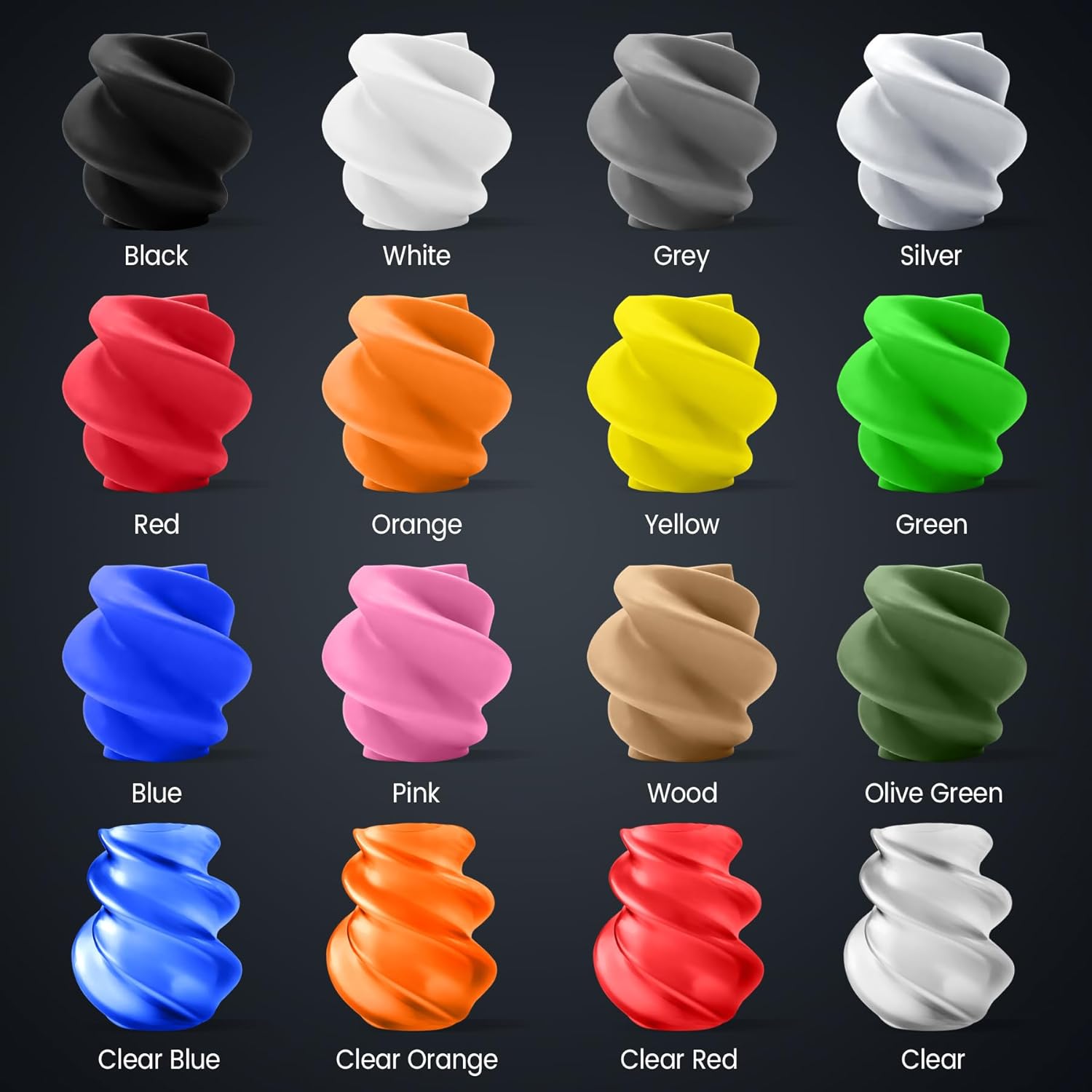
【Abundant Color Options】- Color: Black, White, Grey, Red, Blue, Green, Yellow, Orange, Pink, Silver, Olive Green, Wood, Clear, Clear Orange, Clear Red, Clear Blue
【PLA Filament Bundle】- Provides 16 color options to meet different printing needs of users, allowing users to choose according to preference and project requirements.
【SUNLU PLA 3D Printer Filament】- SUNLU PLA filament is reliable, versatile, and easy to use. No clogs, bubbles, or tangles, its excellent layer adhesion ensures high-quality prints every time.
【Clog-Free & Bubble-Free】- Designed and manufactured with superb layer bonding and great fluidity for smooth and stable extrusion.
【PLA Filament 1.75 mm】- SUNLU PLA filament consistent diameter tolerance 1.75mm ±0.02mm, Tight tolerances make PLA filament smoother and more consistent when printing.
【Neatly Wound 3D Filament Spool】- 100% neat rate that reduces the risk of tangles and jams, and provides a smoother and more efficient 3D printing experience.
【Filament Spool Diameter】- PLA 0.25KG Spool Diameter: 140mm, Spool Width: 36.3mm, Spool Hub Hole Diameter: 53mm. Compatible with 99% of 3D printers.
【Wide Compatibility】- SUNLU PLA 250G filament has a diameter accuracy of +/-0.02 mm, small diameter error, wide compatibility, and can be used on various common 3D printers.
【Recommended settings】- We recommend a printing speed of 100-200mm/s, a nozzle temperature range of 210-240℃ and a print bed temperature of 50-60°C.
【SUNLU Main 3D Products】- SUNLU offers a wide range of high-quality 3D printing products, including 3D printing filaments, 3D printers and various materials.


Clarence E. Royce –
REALLY GOOD PLA
‘A Good and Superb PLA!’Frankly Id heard many fine things and some favorable comment on SUNLU Filaments!So having bought a roll an done a project I can Honestly Report that most of the favorable things reported are in truth correct as it is a ‘Very Fine’ Plastic and SUNLU definitely has its act together!!!.PROS:Makes a Neat an Classy looking Part!Easy to Run, Easy to Set Up!Its the Real Deal You Get A Full Roll of !st Class Filament!Almost the Only Silk PLA Plus+ on the Market!!!!!A Real Bargain as the Price is Fantastic for what you get!.Fast Amazon Shipping cannot be Beat!!!!!CONS:None actually cept If Id known this was a PLA+ Id have ordered it sooner!!!!!In General:Now In My Useage The SUNLU worked and printed quite well.Setup was simple, I use Sticky Blue painters tape.Set Nozzle at 259 and Bed 109 and let warmup for 10-15 mins.I set 1st Layer at Nozzle 257 Bed 100, Speed at 35 or 40!Then after 1st layer is down and hard I set the rest of the run at about say:Nozzle 250- or 255 Bed 60 0r 75 and let Speed run at 45…True “I Know” at those settings Ill get some stringing but ‘I dont have any problems with layers not bonding and It don’t take ‘All Day’ to get the part finished either.Yes I know there are all kinds of ‘Micro-settings, But I know that most machines have there own ‘Pet Settings for wanting to run right.Now most folks want to run ‘Cold and Fast’ But I tried that and got a LOT of junk parts!.For me I found that “Slow but Hot” seems to get ‘Better Parts’…..Me I adjust my speed with a New Plastic until Stringing starts to appear then I back off fast!.I also run my tests a ‘Bit Differently’ as many will run a ducky or a benchly and its a good way.For Myself I have a small but ‘difficult part’, See it dont take much Plastic but if the plastic is good enoughto make a ‘Difficult Part’ then the easy stuff will run Home Free as the SUNLU did!!!!!!!!!!Now One Major Complaint w Sunlu is it doesnt extrude well or the teeth dont grip the Plastic right!.Yes at one time ‘I Had’ that issue but here is how I worked around it!.A HOT TIP:Now sooner or later when the teeth wear down you will have to replace that drive extruder gear!.On most new machines its the round Brass One w the two small allen nuts sticking out the top side!Most guys re install the gear wrong, I know I did??????Yes I did as most of us will do what the YouTube guys did as they ‘Set It’ Plumb in the middle!.Hey if you are satisfied and it works for you go for it!!!!!!!!!!But there’s a Better Way, In stead of in the Middle I just slid the Gear down a notch and let the plasticrun off the teeth on the Top Side of the Gear as it grips better and runs smoother too.Oh yes it will surely wear like they all do in time, But if you did it right there is no great need to replace the gear not by any means sic!!!…Just loosen the allens then “CAREFULLY” slide the gear back upwards until the Teeth on the bottom which are still good are NOW gripping the plastic as I think its pretty neat to reuse and get good service from the same part twice!!!!!.TO: Close;SUNLU Silk PLA is super good stuff that is easy to set up, It runs fine and makes a good part!.And to Finish Its the only PLA+ that runs a silk fibre so it has Very Considerable strength and I definitelyIntend to try some Printer Gears with this and the smooth finish makes a classy looking part too!.Kudos to the Seller!Kudos to Amazon!Nuff Said…IndianaED
AsterKurayami –
Super Glow!
I purchased this filament with very little confidence it would actually glow,But it works fantastically!The print is smooth and the glow pigment appears evenly distributed.I got beautiful results.
James White –
Great quality for the price
Good quality and super pretty! Great value and great print quality. Only complaint is it’s more purple on the reel than pink.
Kelly D. –
GOOD for individual prints. Not so good for prints that need to attach to each other
Good adhering to print bed. However, the filament is brittle for connecting parts.
Kevin R. –
Very nice color, bright if charged by sun, goes dim fast with flashlight
I bought this specifically to print my Red Tron identity disc in. It does not fail to impress.As with any glow in the dark filament, leave it out in the sun all day and it will be brighter and last longer. I just charged it for 20seconds in the photo. With exposure low the photo makes it look brighter of course, but the brightness from just a bright flashlight doesn’t last long. The dull dim lasts for a while though.
Major Williams –
Great colors! Great filament!
Love all of the different rainbow color filaments I got in this order. I’m a girl who loves all of the bright colors and these did not disappoint. The quality of the filament is also very nice and easy to work with in my 3-D printer. I’m almost out so will definitely be purchasing again.
Scott E McMullen –
Be careful. Tricky filament to work with
First I need to state i am new to 3D printing. I recently purchased a Creality CR-10s Pro. Love the machine when it works. I have issues with my machine’s X_Gantry sagging on the side with the X- stepper motor/filament extruder installed and need to zero it out before every print.This isn’t a review of the machine. This is a review of the SUNLU PLA Silk Black Gray Filament. I am doing a large multi-unit job for work (each piece is 280mm x 280mm x 30mm) so needed a lot of filament. My original supplier was out, so I searched the interwebs and found this brand. I have been wanting to try Silk style PLAs, and since the price wasn’t much more expensive, I decided to give it try and bought 3 spools. When it came in I decided to print one of the sample models included with my printer. It printed absolutely awesome. In fact one of my grandchildren still plays with it. Just before I started the job prints, my cooling fan shroud broke, so I printed a new one with this. It printed beautifully, but as I was installing it it came apart at a middle layer. Upon further inspection, I noticed it starting to have layer adhesion problems through the print. I ended up having three complete separations. I was able to glue them back together with CA glue, but what a pain in the @$$.I became nervous about success with the job prints. No surprise the first 6 attempts failed to even adhere to the build plate. I stopped using the SUNLU PLA Silk and returned to one of my personal standard PLS spools and it printed with minimal errors (any errors were mine, beginner remember). I tried it again with a different color standard PLA. Again same results, printed with minimum errors.I contacted SUNLU requesting guidance and they told me the print head temp and build plate temp () need to be higher than normal (210-230C and 60-80C respectively) for PLA SILK vs. standard PLA. Also the print bed NEEDS PVA glue to aid with adhesion. Finally, thinnest print height is required. They recommended .1mm layer height.I made the changes. First print had some very minor bed adhesion but the print was able to recover and finished the print very nicely. Print number 2. No Bueno!. First I noticed one corner not adhering to the print bed. At first it didn’t appear to be bad and though the print would recover. Unfortunately after 24 hours I noticed several other locations lifting up as well. I stopped the print and removed the damaged print. The complete first layer wasn’t even attached to the bottom of the print the lines just fell off in my hand. I checked all my settings and everything seemed fine. I decided to do a thorough cleaning of the build plate and make sure I had good PVA glue coverage before restarting. I decided if it didn’t work this time I was going to return the 2 unopened spools for a refund. Third print finished this morning and looks absolutely amazing. Even better than the first large print with this filament.Lessons learned:1. Be sure to verify recommended print temperatures on the box. They’re not printed on the spool’s label like everyone else. My fault. Felt really stupid when I found them on the second box.2. Be sure everything is a trammed and level as you can possible get them.3. Be sure your built plate is as clean as you can possibly get it4. Use higher temperatures than normal PLA. My temperatures ended up being:a. Printhead: 215-220C (anything higher made the sheen of the SIlk appear dull).b. Build plate: 65-70C, (70 was required before I gave it a thorough cleaning and used PVA glue).5. Layer height: .12mm (one of the magic numbers of my machine. Look up magic numbers if you’re not familiar with them. Make printing appear nicer.).Though I feel some of the errors with my first prints were my fault, I am giving a 3-Star review due to the overall difficulty I had with finally getting a usable print. Comment about the tolerances, the two spools I have used so far are within the stated tolerances.Would I recommend this filament? Sure but only with the caveat there are issues. Once these are overcome the prints looks fantastic.Sorry for such a long review and thanks for taking the time to read the entirety of this. I hope this helps you decide.Update 7/10/2020:All I can say is I am changing my mind about this filament. I just finished unit #4 and thought it looked amazing while it was still on the print bed. However, once I removed it, the first layer immediately started peeling from the print. I have followed all the recommendations of the company and experimented a little myself. 3D printing is supposed to be fun and exciting. This is not fun and exciting. Congratulations to all the users who have had good luck with this filament. I, myself, will not ever buy it again. Nor can I in good conscience recommend it to anyone. When it prints well it is beautiful. But I no longer feel there are any consistent methods to print this filament. Due to the size of the units I am printing for work, I only get 2 units/1kg spool. I have to go back to standard PLA. Good luck.
Dave Goodman –
Constantly jams in the feed tubes on Creality K1C and filament dryer.
Gary –
works very well
Hans T-i*t+z/e –
Perfekt!
Amazon Customer –
Me ha funcionado bien y con buenos resultados. La calidad del producto no es la mejor, pero tampoco es una chafada, cumple bien, funciona bien y no desepciona. No es nada mala compra.
Christopher P Vardy –
Very compact filament dryer. So far I have used it for ePLA and TPU spools while printing. Nice and lightweight so it sits on the top of the printer currently on a small custom printed plate (though it will be moved to a shelf soon).Recommended for those printers that do not have an AMS type changer system and want a good way to keep their filaments in good condition while they are printing.